Hills Bank's online banking platform is easy to use and gives you greater control of your finances. Enjoy access to your accounts 24/7 for convenience and security wherever you are. If you do not currently have online banking but would like to sign up, click enroll and follow the prompts.

View this video demo to see how bill payment can make payments easy.
Features:
Turn Debit Card On/Off
Turn your debit card on or off through Hills Bank Online! Simply log in and select Features, then Turn Debit Card On/Off. Select a card to turn it off, and if you later find the card and want to turn it back on, just repeat the process.
Available Balance
Available Balance
When you deposit money via a check or perform a transfer, you might notice that the amount of money available is different than the current balance. That's because these transactions are on hold - preventing them from being withdrawn until the hold has been released.
Your available balance is the amount of money that can be used immediately.
Your current balance is the total amount in your account - including funds that are being held.
If you spend or withdraw more than your available balance, you may be charged an overdraft fee or non-sufficient funds fee - even if your current balance is higher than the amount spent or withdrawn.
FAQ: How can I see my available balance in Hills Bank Online?
You can easily see how much is available to use next to "Available Balance" under the Accounts section.
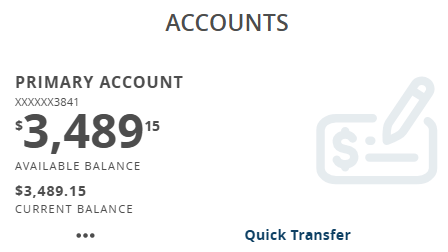
Now, this section will display detailed information on the amount of money available to you. You can see a list of your pending transactions by selecting the account.
Deposit Checks Remotely
Deposit a check directly into your account using our new app by simply taking a picture of the front and back of your check.
How to remote deposit a check?
Goals
Transfer Funds to Another Person
Send a Person to Person transfer without knowing their account information. All you need is their email address.
Manage My Finances
Manage My Finances
Get a handle on your whole financial picture! You can include accounts from other financial institutions, add credit cards, set savings goals, and create budgets. Now you can plan for the future while you manage your funds. Log into your Hills Bank Online account and select Features followed by Manage My Finances to try it out!
Transfer Funds to Another Hills Bank Customer
Easily transfer one-time, future, or recurring transfers to another Hills Bank customer.
Bill Payment
Bill Payment
Bill payment is free, with unlimited payments each month. However, fees will be deducted from your account if you opt for expedited payments or gift checks. Sign up for bill payment through Hills Bank Online by logging in and selecting Pay/Transfer on the navigation menu, then Visit Bill Pay Site and complete the enrollment process.
Send Secure Messages
Send messages and upload documents to Hills Bank safely and securely. Select Features followed by Messages to view and respond to messages.
Receive statements and notices electronically
Receive email alerts when statements and notices are ready and view them within Hills Bank Online. You can access up to 18 months of statements by logging in, selecting the Features tab on the navigation menu, and choosing Sign Up For & View Statements to see a list of your monthly electronic statements.
Text Banking
Text Banking*
Enroll in text banking through Hills Bank Online to begin banking via SMS messages. Simply log in, click on “Services” in the left-hand navigation bar, then “Text Enrollment.” The following commands are available from the short code 226563 (BANKME) although alerts and secure access codes sent from Hills Bank Online via text message will come from 878787.
Send the following commands to 226563 (BANKME)
- BAL – current balance for all enabled accounts
- BAL <account nickname> - current balance for specified account
- HIST <account nickname> - recent history for specified account
- XFER <from account nickname><to account nickname><amount> - transfer amount indicated from first account specified to second account specified
- LIST – list of text banking commands
- HELP – list of contacts for text banking information
- STOP – disable text banking
*Hills Bank provides mobile banking without charge. Account transaction limits and fees apply. Message and data rates may apply. Text STOP to cancel or HELP for help to 55658. View full terms and conditions or privacy policy, without charge. Text "HELP" to 226563 (BANKME) for help. Unsubscribe from mobile banking any time by texting "STOP" to 226563 (BANKME) to cancel.
Connect to Quicken® and QuickBooks®
With Hills Bank Online, you can connect to Quicken® and QuickBooks® software.
Additional Business Services
Hills Bank OnlineTM also offers ACH Origination and Positive Pay for businesses. Learn more or contact a Treasury Management Representative at 1-800-445-5725 (1-800-HILLSBK) for more information.
For the best Hills Bank Online experience, please make sure you have the most updated web browser.
Google Chrome
(for Mac & PC users)
Mozilla Firefox
(for Mac & PC users)
Microsoft Edge
(for MAC & PC users)
Apple Safari
(for Mac users)