

Saving for retirement and other goals can be intimidating – but it doesn't have to be. We're making it easier to chart your course to life's big moments with Hills Bank Wealth Builder, an investment platform that's personalized to you, and managed by Hills Bank's Wealth Management Team.
It's easy to get started. Whether you're rolling over an existing retirement account or getting a fresh start on your saving, you can set up your Wealth Builder portfolio in three easy steps:
- Create an account
- Tell us about yourself and fund the account
- Hills Bank starts investing for you
Fund your Wealth Builder account with as little as $10 and get started today!
-
Your Portfolio - Built By Us
Let Hills Bank build your diversified portfolio and skip the hassle of picking your own investments. We will continually monitor your investments, rebalance your portfolio, and reinvest your dividends.
-
Save for Your Goals
It's not just for retirement. Use Wealth Builder to start saving for a wedding, down payment, college, and more.
-
Track Your Progress
Using your desired savings targets and deadline, Wealth Builder will track and display your progress with the Goal Forecaster tool. Plan with more confidence and make adjustments as life happens.
Monte Carlo simulation (left) shown for illustrative purposes only. Real earnings may differ.
Start your journey with Hills Bank Wealth Builder today.
Open An Account-
How much do I need to get started?
You can create a Hills Bank Wealth Builder account with as little as $10.
-
What platform does Hills Bank Wealth Builder use?
Wealth Builder uses Betterment, a trusted provider of digital investment services.
-
I already have a retirement account. How can I roll it over to Wealth Builder?
Get in touch with us for assistance in rolling over existing retirement accounts, such as Roth IRAs, 401(k)s, and other individual retirement accounts.
-
How do I add a beneficiary to my Wealth Builder account?
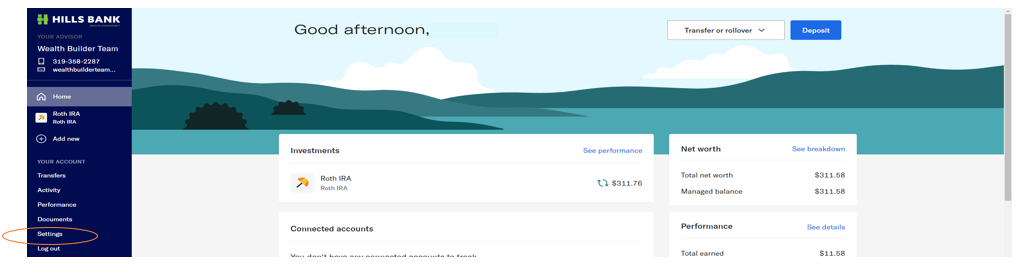
-Log in to your Wealth Builder Betterment Account.
-On your home page select “settings” on the menu on the left-hand side of your screen
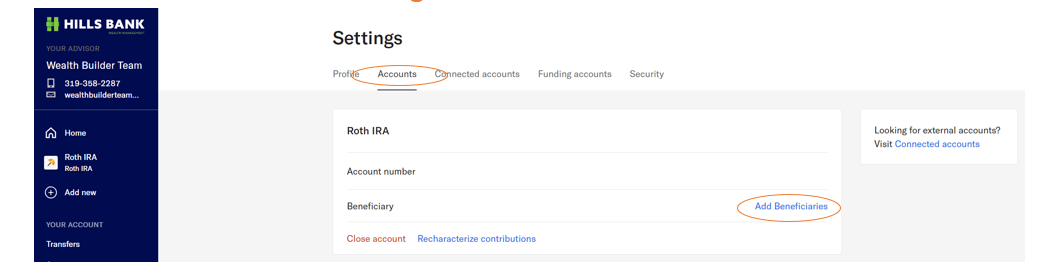
-On the settings screen there is a menu across the top of the page. Select “Accounts”.
-This page will show your account number and your beneficiaries.
-You can add or edit your beneficiaries by selecting “Edit” or “add beneficiaries”
Investment products are not a deposit, not FDIC insured, not insured by any federal government agency, carry no bank guarantee, and may go down in value.